- About 800 min of notes
- or 266 min with frames
- 150 GB media storage · capacity limits not enforced yet
- Submit one file at a time; one task processing per account
- Export MD · TXT · SRT · VTT

Turn video and audio into notes you can actually read
Upload a course, talk or interview and get a timestamped transcript, a summary and notes by chapter.
Add relevant key frames from video.
A 19-minute lecture,
turned into this
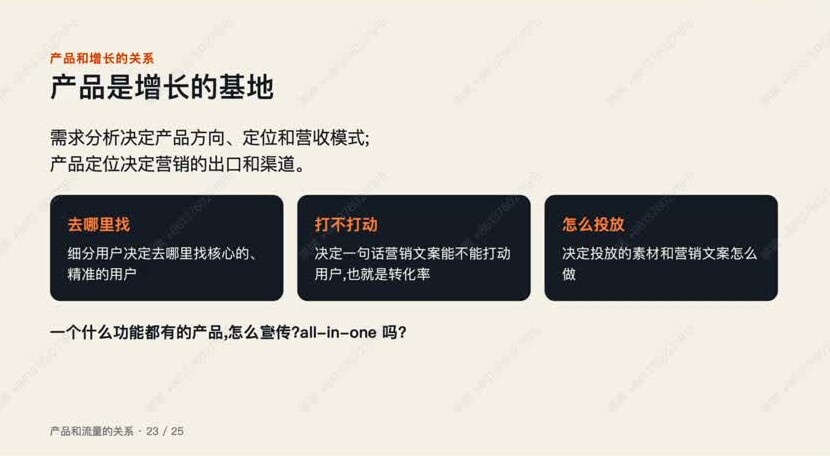
The talk is in Chinese; the notes are in English. Click a timestamp to jump the video, and check the original transcript on the rightbelow.
Demand, product and traffic form one loop
- The product is the base of growth: demand analysis sets its direction, positioning and revenue model.
- Your user segments decide where to find core users, and how to write the copy and ads.


Three steps,
priced before you start
Confirm the processing range and cost before processing. If the selected notes are still incomplete after automatic retries, processing credits return to their original sources and expiry dates.
Upload a file
Drop in one video or audio file at a time.
Pick an output, see the cost
Notes only 1 credit/min, with frames 3 credits/min.
Read, check, export
Click a timestamp to listen back, fix typos, then export.
Read it fast. Find it again. Take it with you.
One result: transcript, key frames and exports, ready together.
Every sentence has a timestamp.
Click it to hear the original.
The current sentence lights up as it plays, and a misheard word can be fixed in place. English and Chinese are detected automatically. Listen back before you quote.
Try it free
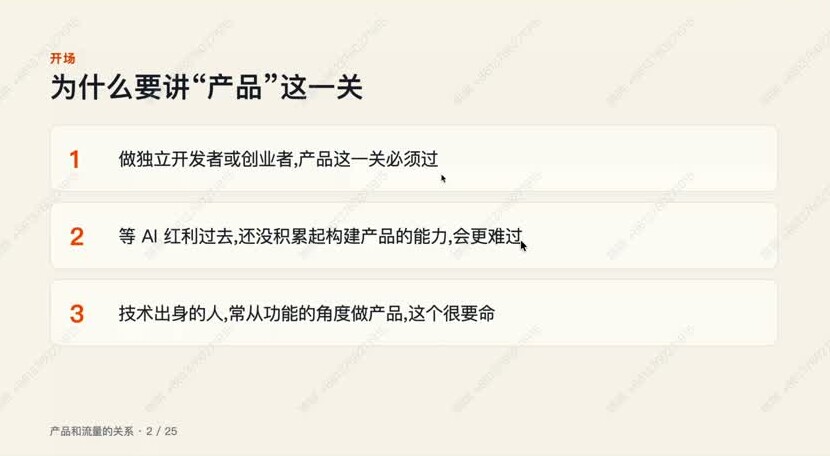
Engineers tend to start from features.

Demand analysis sets direction, positioning and revenue.
Relevant key frames,
beside the matching notes
Notes with frames places relevant video frames beside the matching section notes, so you can review slides and whiteboards in context. Not every section needs a frame.
Try it freeExport into your own notes
Notes export as Markdown, zipped with images when there are any. Transcripts export as TXT, subtitles as SRT and VTT. Only you can see your files by default.
Try it freeLectures, interviews, meetings
Anything already recorded as a video or audio file.
Courses and lectures
Review by chapter, with each slide next to its points. No more scrubbing.
User interviews
Find the exact quote by timestamp when you write up, and listen back before you cite it.
Podcasts
Pull out each episode's key points and quotable lines as show notes.
Meeting recordings
See where a decision was made, and click the timestamp to hear it again.
Internal training
Turn training videos into documents new hires can read, demo frames included.
Just subtitles
Every result exports SRT and VTT files for your video editor.
The two most common uses,
one result each
One file gives you a transcript, summary and section notes. Choose Notes with frames to include relevant video frames.
Lectures:
review chapter by chapter
Video · 19:21 · 12 chapters · 9 frames

Product skill is the base of traffic and growth

- Engineers often build from features and skip product and user thinking.
Interviews and podcasts:
find the quote in one click
Recording · 48:02 · Summary · 7 chapters

The interviewee runs 3 user interviews a week. Finding quotes again takes the most time; they care less about formatting than about every line linking back to the audio.
“I don't need it to read beautifully. I need to know where each line was said.”
Try it free, then pick by usage
Choose credits or personal Unlimited. Save up to 45% with annual billing.
- About 2,000 min of notes
- or 666 min with frames
- 300 GB media storage · capacity limits not enforced yet
- Submit one file at a time; one task processing per account
- Export MD · TXT · SRT · VTT

- Personal unlimited, illustrated notes included
- 750 GB media storage · capacity limits not enforced yet
- Submit one file at a time; one task processing per account
- Export MD · TXT · SRT · VTT

Not ready to subscribe? One-time credit packs are available too.See all pricing
Before you start
Only youYour files belong to your account
Files, transcripts and notes are visible only to your account.
Deleting a file from your library queues cleanup of its files, transcript and notes. Cleanup may take time.
If the selected notes are still incomplete after automatic retries, processing credits return to their original sources and expiry dates. Expired or retired credits do not become available again.
Can I paste a video link?
How much is free? Do I need to log in?
How long or large can a file be?
What’s the difference between Notes only and Notes with frames?
Can I export PDF or PowerPoint?
Which languages work? Can notes be in another language?
How accurate is the transcript? Can I fix mistakes?
Can I move it into my own notes app?
Other questions?Contact us
Turn the recording you never had time for
into notes you can actually read.
60 free credits each week · usable across up to 3 tasks