AI Video Summarizer for Your Own Video Files

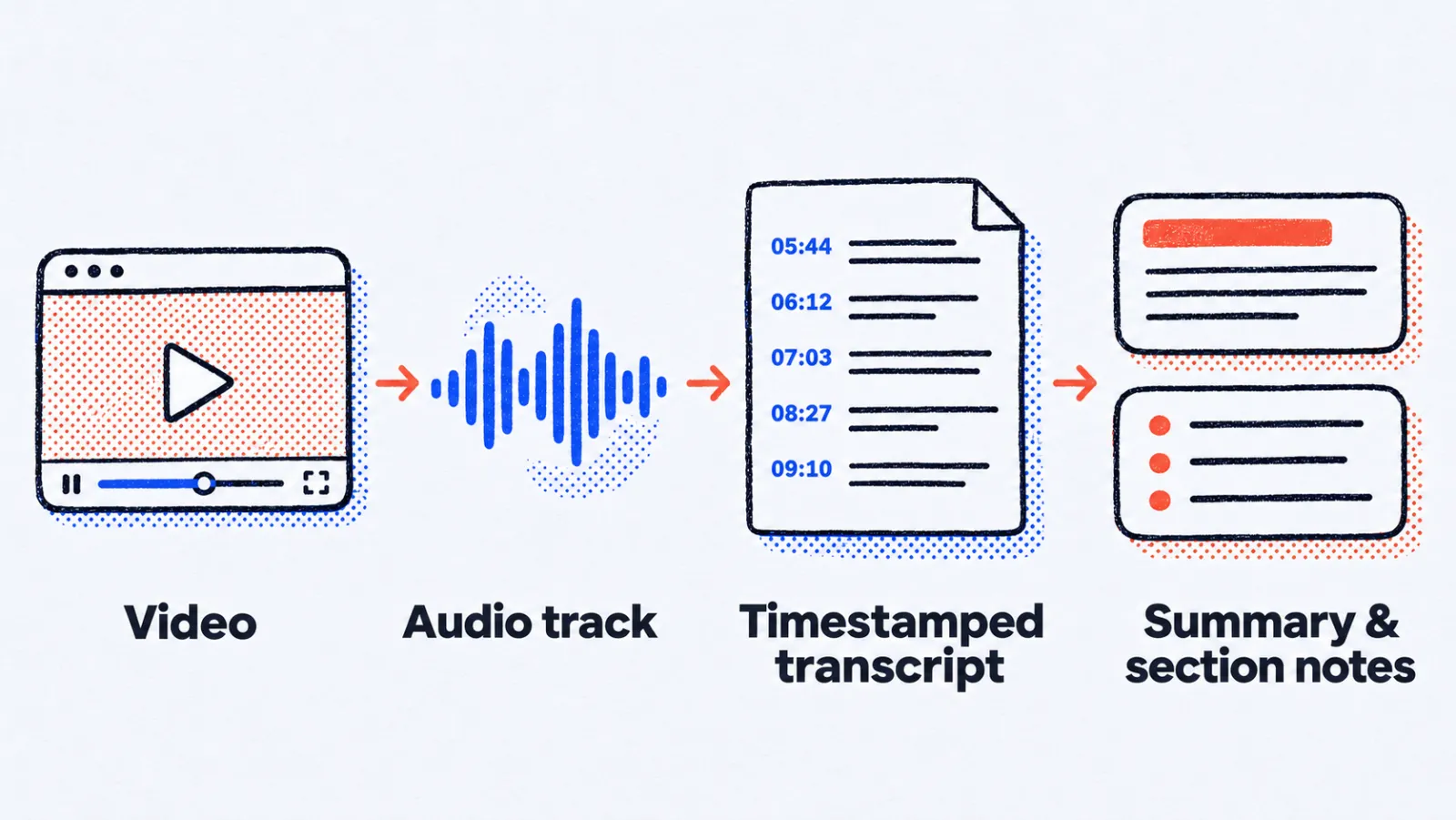
Upload a webinar, meeting recording, interview or course video and get a short video summary, key points and timed chapters. Click a chapter to jump back to that moment.

See a real summary

80 free credits across 3 files a week · up to 40 min of Notes only

  • Price shown before you start
  • Incomplete output: credits returned
  • Private by default

A real video summary, start to finish

A 59:57 conference keynote from PyCon Taiwan, processed with Notes with frames for 240 credits. Unedited output: a short summary, key points and timed chapters that jump back to the video.

From Local Roots to Global Impact: Why Community Participation Matters

Georgi Ker explains how people can find meaningful ways to participate in Python communities, whether through organizing, design, documentation, coding, or simply listening and learning. Drawing on her work with PyLadies, PyCon Thailand, PyCon APAC, and PSF diversity and inclusion efforts, she offers practical advice for building welcoming local groups, connecting them globally, and sustaining volunteer contributions. The talk emphasizes that community depends on trust, collaboration, recognition, and adapting Python to the diverse people who use it.

Key points

  • Participation can take many forms; identify your strengths, interests, and the problems you want to help solve.
  • Start a community by finding people with shared interests, beginning in a comfortable setting, and working together on a common problem.
  • Build connections beyond local groups by sharing activities, using global communication channels, documenting chapters, and exchanging reusable resources.

PyCon Thailand involvement 11:14

12:30A timeline shows Ker's PyCon Thailand logo design and her later marketing, branding, design and sponsorship work.
  • The original PyCon Thailand logo was later replaced because it did not comply with Python logo rules.
  • Ker recommends contacting the trademark workgroup for guidance when designing logos for Python-related projects.
  • The following year she helped with marketing, branding, design and sponsorship; in 2020 she stepped up to lead PyCon Thailand.

Create a community around shared interests 36:47

38:30The slide lists practical steps for creating a community, beginning with conversations and shared interests.
  • When a suitable community is not nearby, start one with a conversation; find people with shared passions, invite them to work on what interests them, and begin in a comfortable space.
  • As an example, Guido van Rossum started a group of 4 to 10 people, mostly colleagues at CNRI, to expand Python’s core development.
  • The speaker said a comfortable starting group can help turn ideas and passion into a real product.

Connect local communities to global networks 40:35

42:30Slides present social media promotion, chapter organization, resource sharing, and regional or global volunteering as ways to connect local communities globally.
  • Promote activities through the social media channels that work best locally, while also identifying and using channels that reach the global community.
  • Share community posts across networks; even a small number of reposts can help.
  • Once a group is stable, bring its chapters and events together in a searchable, accessible place. PyLadies Brazil lists 44 chapters, including 30 active and 14 inactive, with contact information.

+ 31 more sections and the full transcript
Show a transcript excerpt
  1. 36:47 Now, you might ask, what if there's no community around me
  2. 36:54 that speaks to me, that actually creates?
  3. 36:59 Well, you know what? That is the best thing. That's the most fun thing. Then you create your own community.
  4. 37:05 So if you don't have one, you create one.
  5. 37:09 How do you know? How can you create? What are you going to do? So you're going to create your own community
  6. 37:16 by first starting with a conversation. The moment you start with conversation, that is where the community starts.

A technical talk with slides and a live demo

A 25:10 talk from PyCon Hong Kong on Python observability, summarized into 15 chapters and 8 key points, with the slides and code from the screen.

02:30Comparison of monitoring and observability by focus, data sources, incident examples, and insight into underlying causes.

Pydantic Logfire: Python Observability in Practice

Adapted from Pydantic Logfire: Empowering Python Observability · Hemangi Karchalkar, PyCon Hong Kong 2024 · CC BY 3.0

The talk introduces observability as a way to understand the causes behind system behavior using logs, metrics, and traces, and contrasts it with monitoring’s focus on detecting symptoms. It presents Pydantic Logfire, an OpenTelemetry-based Python SDK and hosted platform, and demonstrates instrumentation, telemetry inspection, SQL queries, exception capture, dashboards, and alerts. The session ends with a short audience quiz.

  • Observability uses logs, metrics, and traces to help explain a system’s internal state; monitoring primarily detects symptoms and supports incident response.
  • Traces group spans that describe individual operations, their timing, context, events, and relationships across a request or transaction.
  • Pydantic Logfire provides an open-source SDK built on OpenTelemetry and a hosted service with a web UI and database; the SDK can also export data elsewhere.

25:10 · Notes with frames · 104 credits · 15 sections · 8 key points

What the video summarizer gives you

One upload, four layers. Read as far as you need and stop.

A short summary

What the video is about and what it concludes, in one paragraph at the top.

Key points

The claims, numbers and decisions worth remembering, as a short list.

Timed chapters

The video split into chapters. Click a time to play that part.

The full transcript

Every word with timestamps, searchable, when you need to check a quote.

From upload to summary in three steps

Most hour-long recordings are ready in a few minutes. You can close the page while it runs; the file waits for you in Files.

  1. 1

    Upload the file

    Drop in an MP4, MOV or WebM. The language is detected for you, or choose it before you start.

  2. 2

    Check the cost

    You see the length, the credits it will use and your balance before processing starts. If your balance covers it, the summary starts on its own.

  3. 3

    Read, check and share

    Start with the short overview, open a chapter when you want more, and send a link to your team.

Summarize video files you cannot paste a link for

Most video summary tools only work with public YouTube links. ClipNoter is a video summarizer for your own video files: webinar exports, team recordings, unlisted courses and interviews that were never meant to go public.

Watching itSummarized
Your timeThe full length, or 2× and miss thingsA short summary, then only the parts you need
Private recordingsFine, but slowWorks on files that were never posted online
Long videosHard to stay focused for three hoursChapters for every part, up to 10 hours after purchase
Sharing what you learnedWrite it up yourselfSend a share link or a Markdown file
Checking a detailScrub the timelineClick the chapter time or search the transcript

Built for long videos and other languages

Up to 10 hours per file after purchase

Conferences, all-day trainings and long interviews fit in one upload. The video summary stays short; the chapters carry the detail.

Summaries in your language

Summarize a video in Spanish, Japanese or Chinese and read the summary in English, or the other way round.

Private by default

Your files and video summaries are visible only to your account until you create a share link.

Who uses an AI video summarizer

Anyone with more recordings than time. These are the videos people summarize most.

  • Webinars and conference talks

    Get the argument and the numbers without the intros and the sponsor slots.

  • Team and all-hands recordings

    Catch up on a meeting you missed from the summary, then jump to the decision.

  • Customer and research interviews

    Summaries for each interview, with the quotes one click away in the transcript.

  • Online courses

    Decide which module to watch in full by reading its summary first.

  • Product demos

    Turn a long demo into chapters your team can link to.

  • Podcasts on video

    Summarize video podcasts you downloaded, with timed chapters.

How much it costs to summarize a video

Summaries use notes with frames at 4 credits per minute by default, or text notes at 2. You see the total before processing starts.

240 credits

A one-hour webinar with key frames, 4 credits per minute.

120 credits

The same webinar as text notes, 2 credits per minute.

80 free credits

Every week: 20 minutes with frames, or 40 minutes as text notes.

Video summarizer pricing

Choose credits or personal Unlimited. Save up to 35% with annual billing.

Starter
A few recordings a month
$11.90/ mo
$15.90$142.80 billed yearly, save $48.00
800 credits / month
  • 800 min transcript / 400 min notes
  • or 200 min with frames
  • 150 GB media storage
  • Export MD · TXT · SRT · VTT
ProRecommended
Interviews or lessons every week
$19.90/ mo
$29.90$238.80 billed yearly, save $120.00
2,400 credits / month
  • 2,400 min transcript / 1,200 min notes
  • or 600 min with frames
  • 300 GB media storage
  • Export MD · TXT · SRT · VTT
Unlimited
Frequent personal learning and research
$38.90/ mo
$59.90$466.80 billed yearly, save $252.00
Personal unlimited, Notes with frames included
  • Personal unlimited, Notes with frames included
  • 750 GB media storage
  • Export MD · TXT · SRT · VTT

Not ready to subscribe? One-time credit packs are available too.See all pricing

Free · 80 credits every week

  • Up to 3 tasks a week
  • Transcript 1 / Notes 2 credits per min
  • With frames: 4 credits/min in total
  • Resets Monday 00:00 UTC

Video summarizer questions

Only you

Your files belong to your account

Private by default

Files, transcripts and notes are visible only to your account.

Delete anytime

Deleting a file from your library queues cleanup of its files, transcript and notes. Cleanup may take time.

Incomplete output: credits returned

If the output required by your selected mode is still incomplete after automatic retries, processing credits return to their original sources and expiry dates. Expired or retired credits do not become available again.

How do I summarize a video?
Check the credits, upload the video file and wait. The video summary opens first, followed by key points, timed chapters and the full transcript.
Can I paste a YouTube link?
Not yet. The video summarizer works with files you upload, including recordings that are not online. Link import is planned.
How long can the video be?
Free accounts process and keep the first 30 minutes. After purchase, up to 10 hours and 5 GB per file.
How much does the video summarizer cost?
Summaries with key frames cost 4 credits per minute and text notes 2, so a one-hour webinar costs 240 or 120 credits. Free accounts get 80 credits every week.
Can I get key frames in the summary?
Yes, by default. Notes with frames, at 4 credits per minute, place frames from the video beside the matching chapters. Choose text notes at 2 credits per minute if you only need the words.
Is the AI video summarizer accurate?
Each summary is written from the full transcript, and every chapter links back to its moment in the video, so you can check any claim in seconds.
Which languages can I summarize?
English, Chinese, Japanese, Korean, Spanish, French, German and Portuguese. The spoken language is detected automatically, and the summary can be written in a different language from the video.
What happens if processing fails?
If the notes are still incomplete after automatic retries, the credits go back to where they came from. You can retry later and confirm the cost again before it runs.
Can I edit the summary?
Yes. On a computer, choose Edit notes to change the overview, key points or chapters, and fix any word in the transcript right on the page. Your edits are saved and included when you export.
Can I share a video summary?
Yes. Create a share link for one file, or export Markdown. Shares can be stopped at any time.

Still have a question? Get in touch

More ways to use ClipNoter

Summarize your next long video

Upload a webinar, meeting or course video and get a short summary with timed chapters. 80 free credits every week.